


Reading an affiliate’s statement
An affiliate’s statement lists the orders behind their balance: what each order earns, what was already paid on it, and what is due. This article explains how to read it and how to print or export it.
Open a statement
Go to Affiliate Reports → Payouts and click the affiliate’s name in the Balances table. The statement is titled “Commission statement:” followed by the affiliate’s name. All affiliates takes you back.
At the top, four figures sum up the affiliate’s record: Earned to date, Paid to date, Due now, all orders and Pending.
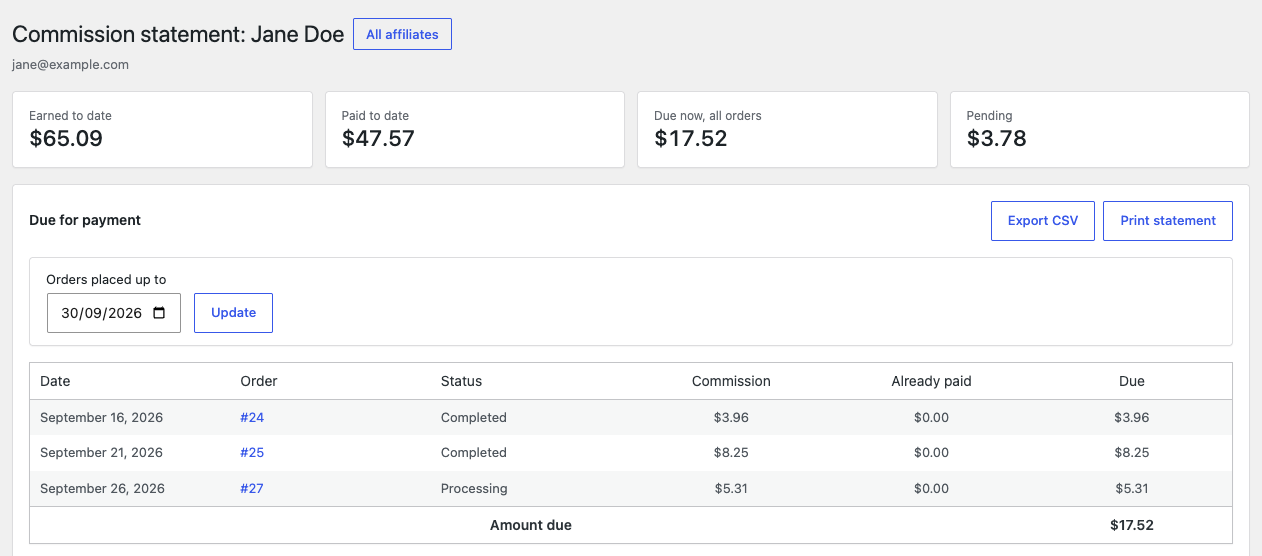
Due for payment
The Due for payment table lists the orders that make up the amount you can pay now.
- In Orders placed up to, pick the last order date the payment should cover. It starts at today and cannot be later than today.
- Click Update.
| Column | What it shows |
|---|---|
| Date | The date the order was placed. |
| Order | The order number, linked to the order. |
| Status | The order’s status now. |
| Commission | What the order earns now. |
| Already paid | What earlier payments covered for this order. |
| Due | Commission minus Already paid. |
Amount due at the bottom is the total of the Due column, and it is the amount a payment recorded from this screen will cover.
The table holds confirmed orders placed up to the chosen date that have not been paid for. It also holds, whatever their date, orders that were paid for and have changed since. When such an order now earns less, for example because it was refunded, its line has a negative Due and the note “Changed after it was paid, taken off this payment”. When it now earns more, its line simply shows what is due on top. See When a paid order changes.
When nothing is due, the table says “Nothing is due for orders placed up to this date.”
Pending orders
Pending, not yet payable lists the affiliate’s orders that are not confirmed yet, with the commission they will earn. They move to the due table once they are confirmed.
Print or export
Above the table:
- Export CSV downloads the lines of the due table as a spreadsheet file.
- Print statement opens a print layout of the statement and your browser’s print dialog. To keep a PDF, choose “Save as PDF” as the destination.
The printed statement shows your site name, the affiliate, the date the orders were placed up to, the totals and the order lines. It carries no customer details, so you can send it to the affiliate.
Also on the statement
- Payment history lists the payments recorded to this affiliate. See Deleting a payment.
- Merge into another affiliate joins two records that belong to the same person. See Merging two records of one affiliate.
- The form to record a payment, under the due table. See Recording a payment.