


The Payouts screen
The Payouts screen keeps track of what each affiliate has earned, what you have paid them and what they are owed now. This article explains the screen and the rules behind its figures.
The plugin never moves money. You pay affiliates your usual way, such as a bank transfer, and record each payment in the plugin, which then keeps the balance.
Before you start
- Commission tracking must be on. While it is off, the screen says so and no payment can be recorded. See Turning on commission tracking.
- The report index must be built. Payments are refused until a full Rebuild index run has finished, so that orders placed before the plugin was installed are never missed. See The report index.
Balances
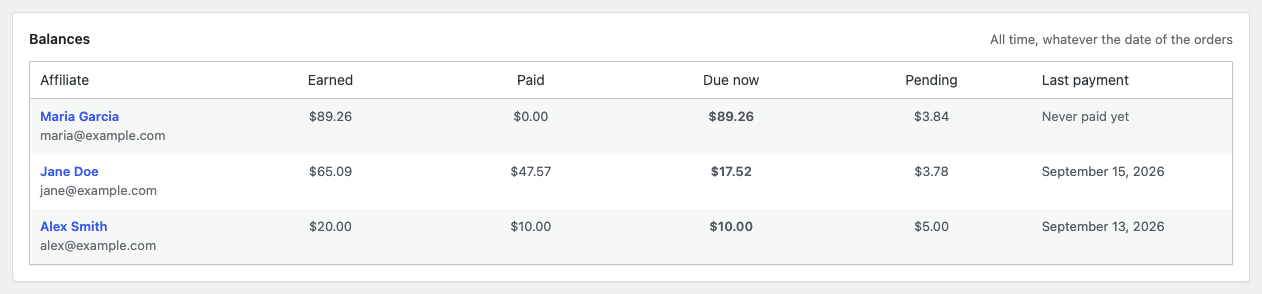
Go to Affiliate Reports → Payouts. The Balances table lists every affiliate with commission on record, whatever the date of their orders:
| Column | What it shows |
|---|---|
| Affiliate | The affiliate’s name, or their email address when the coupon has no name. Click it to open their statement. |
| Earned | Commission on orders that are confirmed now. |
| Paid | Everything you have recorded as paid to them. |
| Due now | Earned minus Paid. It is negative when orders changed after a payment and now earn less than was paid. |
| Pending | Commission on orders that are not confirmed yet. |
| Last payment | The date of the latest payment, or “Never paid yet”. |
The affiliate who is owed the most comes first. Affiliates with nothing earned, pending or paid are left out.
Payment history
Below the balances, Payment history lists every recorded payment, newest first: the date it was paid on, the affiliate, the amount, the method and the number of orders it covers. Click a date to open that payment. See Deleting a payment for what you can do there.
Next steps
- To see which orders make up an affiliate’s balance, open their statement: Reading an affiliate’s statement.
- To record what you paid: Recording a payment.