


Changing the affiliate emails
Both affiliate emails are WooCommerce emails, so you switch them on or off and change their wording on the same screen as your store’s other emails. This article lists their settings and the placeholders you can use.
Open an email’s settings
Go to WooCommerce → Settings → Emails and click Affiliate new order or Affiliate payment in the list. The Edit the email link under Affiliate notifications, in Affiliate Reports → Settings, opens the new order email directly.
The emails use your WooCommerce email design, such as the header image, colors and footer text, like the rest of your store’s emails.
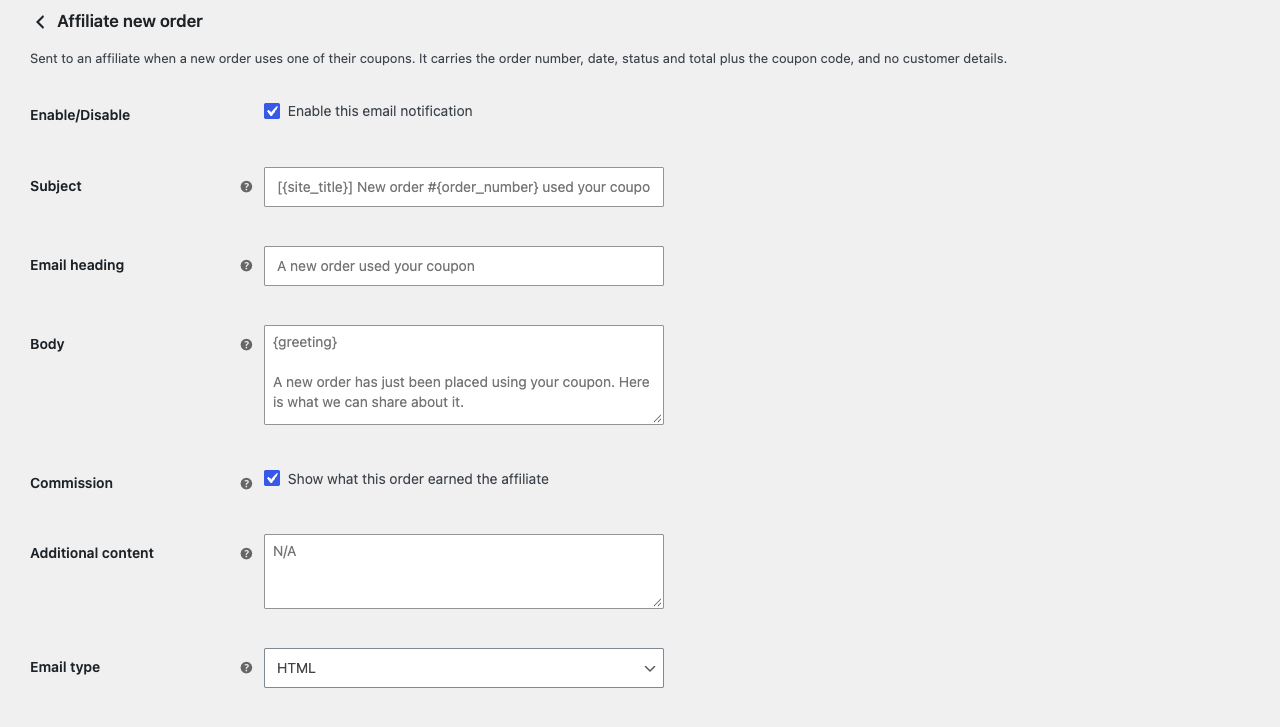
The settings
| Setting | What it does |
|---|---|
| Enable/Disable | Switches the email on or off. Both are on by default. |
| Subject and Email heading | The subject line, and the heading at the top of the email. Leave them empty to use the defaults. |
| Body | The text above the order or payment details. Leave it empty to use the default text. Basic HTML is allowed. |
| Commission | New order email only. Tick Show what this order earned the affiliate to add a commission line, which appears only while commission tracking is on. |
| Additional content | Text shown below the details. |
| Email type | HTML, plain text, or multipart, which carries both. |
Depending on your WooCommerce version and its optional features, the screen can show a few more WooCommerce settings, such as copies to other addresses.
Placeholders
{greeting} becomes “Hi” and the affiliate’s name, or “Hi there,” when the affiliate has no name. The default body starts with it; delete it if you write your own greeting.
| New order email | Payment email |
|---|---|
{order_number}, {order_date}, {order_status}, {order_total} |
{payment_amount}, {payment_date}, {payment_method} |
{coupon_code} |
{order_count}, the number of orders the payment covers |
{commission_amount} |
|
{affiliate_name}, {affiliate_email} |
{affiliate_name}, {affiliate_email} |
Both emails also accept WooCommerce’s own placeholders: {site_title}, {site_address} and {site_url}, and in newer WooCommerce versions {store_email}.
Newer WooCommerce versions can preview an email on its settings screen, filled with sample data, such as a Jane Doe affiliate and a payment of 42.50.
To change an email’s layout beyond these settings, a developer can copy its template into your theme. See Changing the email templates.