


The payment email
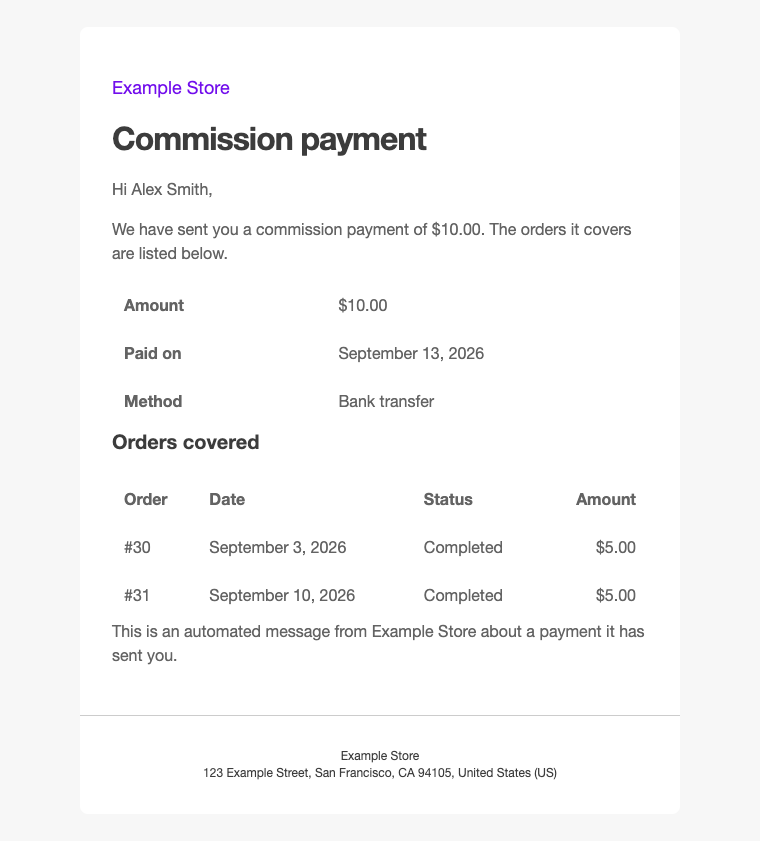
When you record a payment to an affiliate, the plugin can email them a summary: the amount, the date and the orders it covers. This article explains when it is sent and what it contains.
When it is sent
The email goes out when you record a payment with the email box ticked. The box is ticked by default and reads “Email”, the affiliate’s address, then “a summary of this payment”. See Recording a payment.
It is sent straight away, and the notice after recording says whether it went out.
Instead of the box, the form says:
- “The payment email is switched off.” when the email is off in WooCommerce’s email settings, where it is called “Affiliate payment”;
- “This affiliate has no email address on their coupons, so no summary can be sent.” when the affiliate only has a name.
Deleting a payment sends no email.
What it contains
By default, the subject reads “[Your site title] Your commission payment of” followed by the amount, and the email lists:
- the amount, the date it was paid on and, when you entered one, the method;
- the orders it covers, each with its number, date, status and amount.
Orders cancelled or refunded after an earlier payment appear with a negative amount, since the payment takes them into account.
It never includes the note you typed when recording the payment, any customer details, or links into wp-admin.
To change its wording, see Changing the affiliate emails.