




Changes and updates
Most problems on a WordPress site start right after something changed: a plugin update, a new theme, a host moving the site to a newer PHP version. Hera Site Monitor notes every such change, and when a problem starts shortly after one, it tells you which.
What counts as a change
- WordPress updated to a new version.
- A plugin updated, installed, removed, activated or deactivated.
- The theme switched, or the active theme or its parent theme updated.
- The PHP version changed, such as from 8.2 to 8.3.
Every change is listed on the Site Monitor → Changes screen, newest first. The Updates and changes tile on the Site Monitor screen counts the changes of the last 7 days.
When changes are noticed
Updates made from the WordPress dashboard, automatic updates, plugin activations and theme switches are noticed as they happen.
Changes made outside WordPress, such as files uploaded by FTP, SFTP or a deployment tool, or a PHP upgrade by your host, are noticed by a daily check, and also whenever you open the Site Monitor screen.
Checking the pages after an update
About a minute and a half after an update, an activation or a theme switch, the plugin checks your pages again, so a page the change broke shows up without waiting for the hourly check. Like the hourly check, it runs through WordPress’s scheduled tasks, which run when someone visits the site.
Which change caused a problem
When a problem first appears within an hour after a change, its record under Problems says so, and the problem is listed under that change on the Changes screen, for example: “Started 4 minutes after: Plugin Example updated from 1.2 to 1.3.” When several changes came in that hour, up to three are named, the newest first.
A change noticed by the daily check has no exact time, so the line then says “Started after a change the daily check found”.
Hera Site Monitor’s own installation or activation is listed as a change but never named as a cause: it is when the watching started, so a problem found then may have been there before. A problem first seen within an hour of it says “Seen since Hera Site Monitor started watching. It may be older.” An update of Hera Site Monitor itself is named like any other update.
This tells you where to look first. It does not prove that the change caused the problem.
The Changes screen
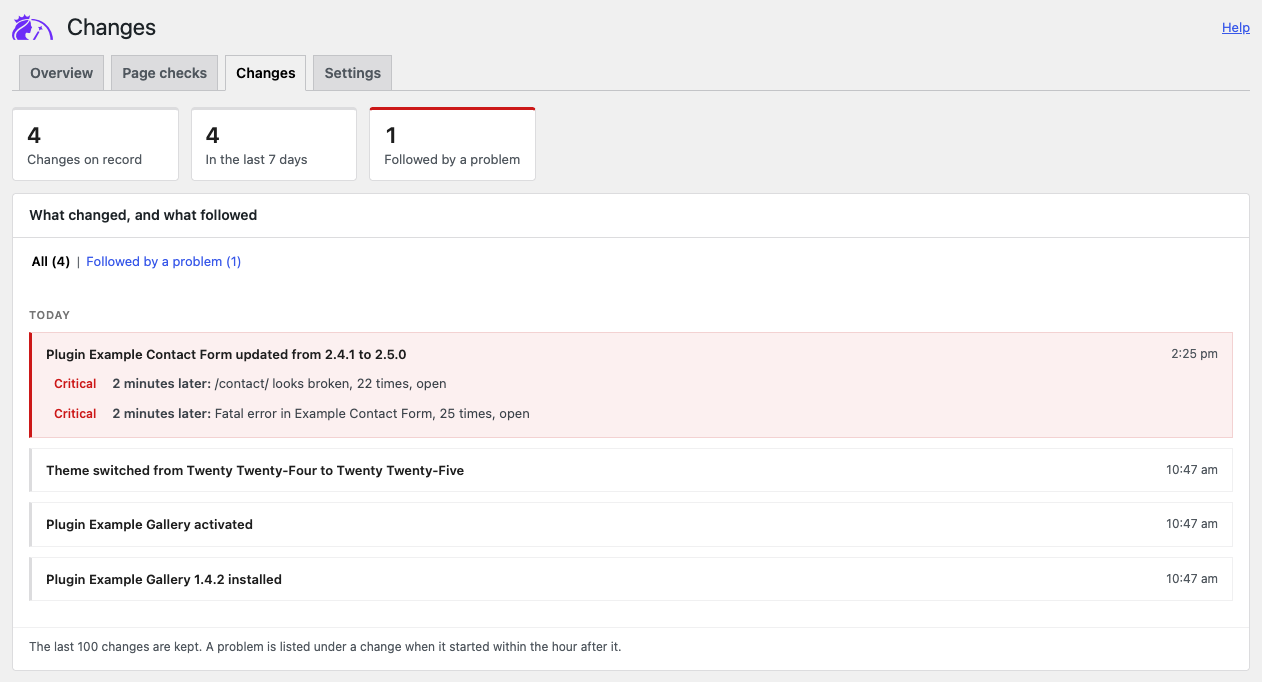
At the top, the figures say how many changes are on record, how many happened in the last 7 days and how many a problem followed. Under them, the changes are listed by day, newest first, with the time of each.
- A change that a problem followed within the hour is highlighted, red when a critical problem followed it. Under it, each problem shows its severity, how long after the change it started, how many times it happened since and whether it is open, fixed or ignored, for example “2 minutes later: /contact/ looks broken, 22 times, open”.
- All lists every change; Followed by a problem lists only the highlighted ones.
The screen shows 20 changes at a time; the links under the list lead to the older ones. The last 100 changes are kept.