


Installing Hera Referral Coupon Reports
This article walks you through installing the plugin and the one step it needs afterwards: building the report index, so that orders placed before the plugin was installed show up in the reports.
Requirements
| Software | Version |
|---|---|
| WordPress | 6.5 or later |
| WooCommerce | 8.0 or later, installed and active |
| PHP | 7.4 or later |
The plugin works with both WooCommerce order storage types, High-Performance Order Storage (HPOS) and the older post-based storage. See Order storage (HPOS).
Install from your WordPress dashboard
- Go to Plugins → Add Plugin.
Older WordPress versions call this menu item Add New Plugin. - Search for “Hera Referral Coupon Reports”.
- Click Install Now on the plugin, then Activate.
While WooCommerce is not installed, Install Now is grayed out, and while it is not active, Activate is. Install and activate WooCommerce first.
Install from a zip file
- Download the zip file from the plugin’s page on WordPress.org.
- Go to Plugins → Add Plugin and click Upload Plugin at the top of the screen.
- Choose the zip file and click Install Now.
- Click Activate Plugin.
Build the report index
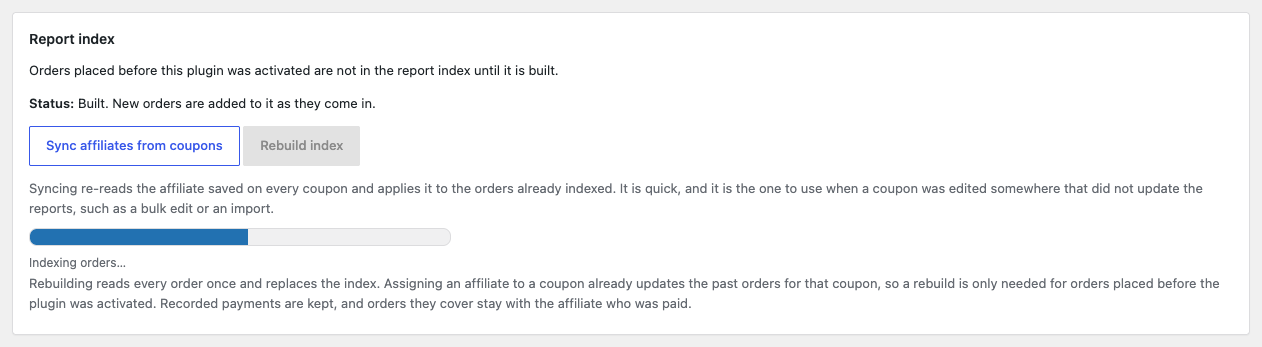
The reports read from an index the plugin keeps of every order that used a coupon. New orders are added to it as they come in, but orders placed before the plugin was installed are only added when you build it, once:
- Go to Affiliate Reports → Settings.
- Under Report index, click Rebuild index and confirm.
- Wait for the progress bar to finish and the message “The affiliate index is up to date.”
Until then, the report screens show a notice such as “The affiliate report index has not been built yet, so these reports will look empty.” with a link to the settings. Build it even on a new store with no orders yet, since payments to affiliates can only be recorded once the index has been built. See The report index.
If WooCommerce is not active
The plugin needs WooCommerce, so WordPress does not let you activate it until WooCommerce is installed and active, and does not let you deactivate WooCommerce while this plugin is active.
If WooCommerce stops running anyway, for example because its folder was deleted, the plugin does nothing and shows this notice to users who manage plugins until WooCommerce is active again: “Hera Referral Coupon Reports for WooCommerce requires WooCommerce to be installed and active.” Your affiliates, reports and payments are kept.
After activation
A new Affiliate Reports menu appears in wp-admin, with Dashboard, Affiliates, Coupons, Orders, Payouts and Settings. Users with the Administrator or Shop manager role can see it.
The plugin never sends anything on its own until you ask it to, and commission is off until you switch it on. Next, set up your first affiliate.