


Setting up your first affiliate
An affiliate in this plugin is simply a name, and optionally an email address, saved on a WooCommerce coupon. This article takes you from a coupon to your first report.
Build the report index first, if you have not yet. See Installing Hera Referral Coupon Reports.
Give an affiliate a coupon
- Go to Marketing → Coupons and open the coupon you gave the affiliate, or click Add coupon to create one.
- Set up the coupon as usual: its code, its discount and any limits.
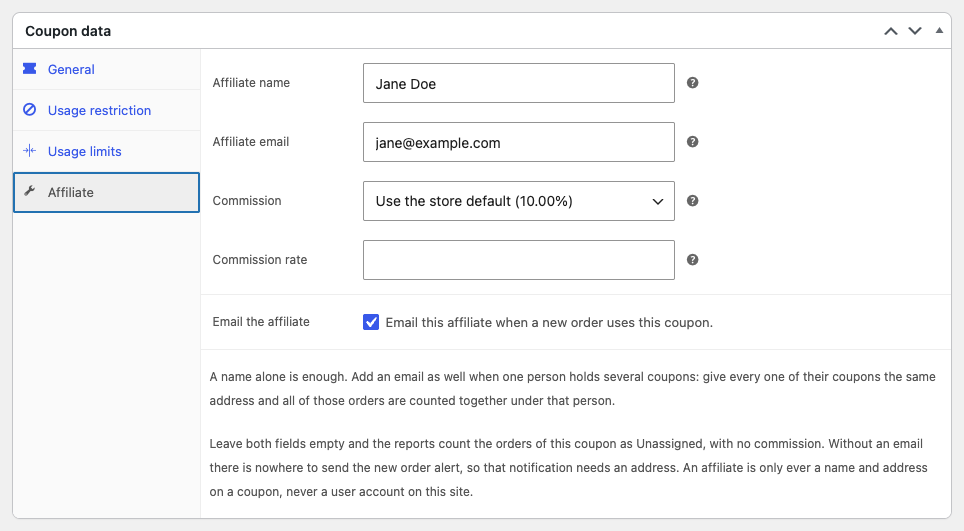
- In the Coupon data box, open the Affiliate tab.
- In Affiliate name, enter the affiliate’s name, for example Jane Doe.
- Optionally, in Affiliate email, enter their email address. It lets you count several coupons as one person and email them. See The Affiliate tab.
- Click Publish, or Update for an existing coupon.
Every order that already used the coupon is credited to the affiliate straight away, and so is every order that uses it from now on.
Read the reports
Go to Affiliate Reports → Dashboard. It shows the orders placed with your coupons over the last 30 days: how many there were, how many were confirmed or cancelled, and what they sold. From there:
- Affiliate Reports → Affiliates shows each affiliate’s figures side by side. See The Affiliates report.
- Affiliate Reports → Orders lists the orders one by one. See The Orders report.
Next steps
- To pay affiliates a commission and keep track of what you owe them, see Turning on commission tracking.
- To email an affiliate when their coupon is used, see The new order email.
- To learn how orders are matched to affiliates, see How orders are credited to affiliates.