


The Coupons report
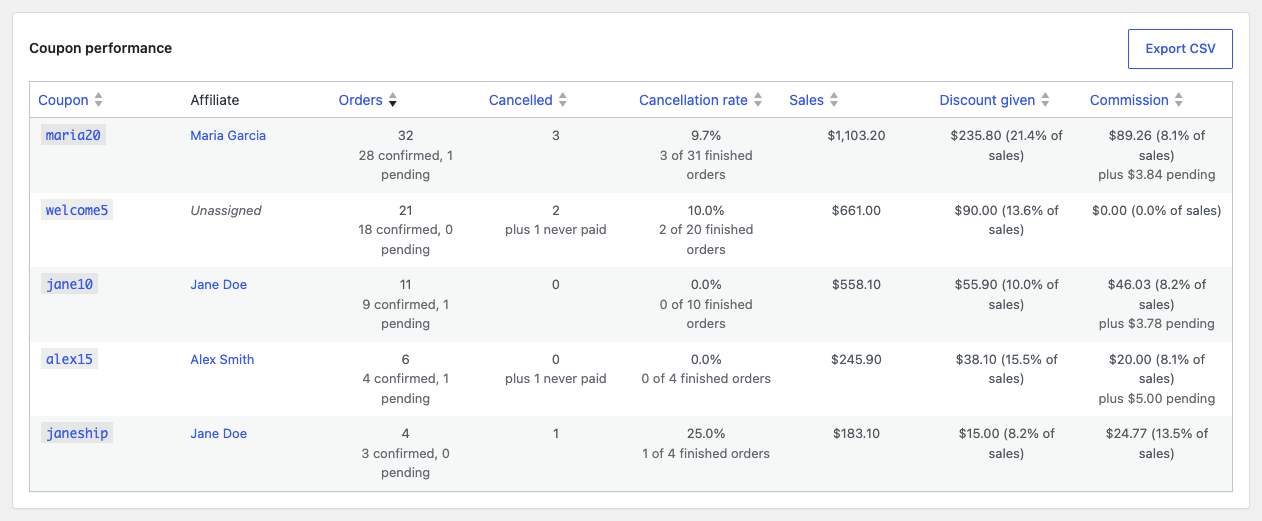
The Coupons report has one row per coupon code, so you can compare an affiliate’s coupons with each other, or see how coupons without an affiliate perform. This article explains how it differs from the Affiliates report.
Go to Affiliate Reports → Coupons. The report covers the period and filters in the bar at the top. See Filtering the reports.
The columns
| Column | What it shows |
|---|---|
| Coupon | The coupon code. Click it to open the coupon. |
| Affiliate | The coupon’s affiliate, or “Unassigned” when it has none. Click the name to open the Affiliates report for that affiliate. |
| Orders, Cancelled, Cancellation rate, Sales, Discount given, Commission | The same figures as in the Affiliates report, for the orders that used this code. Commission is shown only while commission tracking is on. |
The report opens sorted by Orders, highest first. Every column except Affiliate can be sorted by clicking its header. All coupons are on one page.
Orders that used more than one coupon
An order that used two coupons is counted under each of them, with its full sales each time. That is why the rows of this report can add up to more than the dashboard figures, which count each order once.
The same goes for commission. When one affiliate’s two coupons were used on the same order, each coupon shows its own amount here, while the affiliate is credited once, with the larger amount. See How commission is calculated.
Exporting
Export CSV downloads the table as a spreadsheet file. See Exporting and printing reports.