


The Orders report
The Orders report lists the individual orders behind the other reports, so you can check any figure order by order. This article explains its figures, status links and columns.
Go to Affiliate Reports → Orders. The report covers the period and filters in the bar at the top. See Filtering the reports.
Figures and charts
Above the list, the report repeats the dashboard’s figures, with the comparison to the previous period, and its Orders over time and Order outcome charts, for the filtered orders. See The dashboard.
Status links
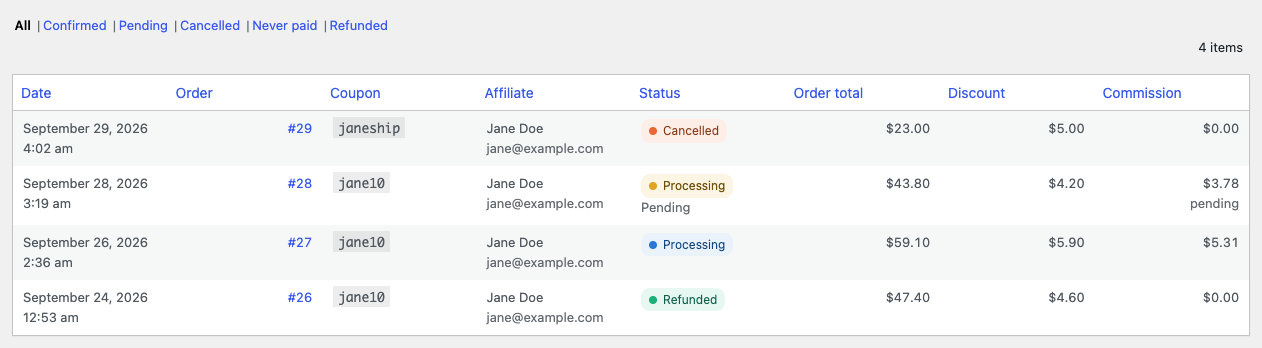
The links above the list, All, Confirmed, Pending, Cancelled, Never paid and Refunded, narrow the report to one outcome. The choice applies to the figures, the charts and the exports as well as the list. For example, with Cancelled chosen, the cancellation rate reads 100.0%.
The list
The list has one row for each coupon used on an order, so an order that used two coupons appears twice. It opens with the newest orders first, 25 rows per page.
| Column | What it shows |
|---|---|
| Date | When the order was placed. |
| Order | The order number, linked to the order. |
| Coupon | The coupon code this row is about. |
| Affiliate | The coupon’s affiliate, with their email address below, or “Unassigned”. |
| Status | The order’s WooCommerce status, colored by outcome. Pending and never paid orders say so on a second line. |
| Order total | The order’s full total, in the order’s own currency, with the refunded amount below when part of it was refunded. |
| Discount | What this coupon took off the order. |
| Commission | What this coupon earns on the order, with “pending” below while the order is pending. Cancelled, never paid and refunded orders show 0. Shown only while commission tracking is on. |
Click a column header to sort by it, and click again to reverse the order.
Export and print
Export CSV downloads every row that matches the filters, not only the page on screen. Export PDF opens a print layout of the report’s figures, charts and summary tables. See Exporting and printing reports.