


The Affiliate tab
The Affiliate tab on a WooCommerce coupon is where a coupon becomes an affiliate’s coupon. This article explains each field and what saving the coupon does.
Where to find it
Go to Marketing → Coupons and open a coupon. The Affiliate tab is in the Coupon data box, after WooCommerce’s own General, Usage restriction and Usage limits tabs.
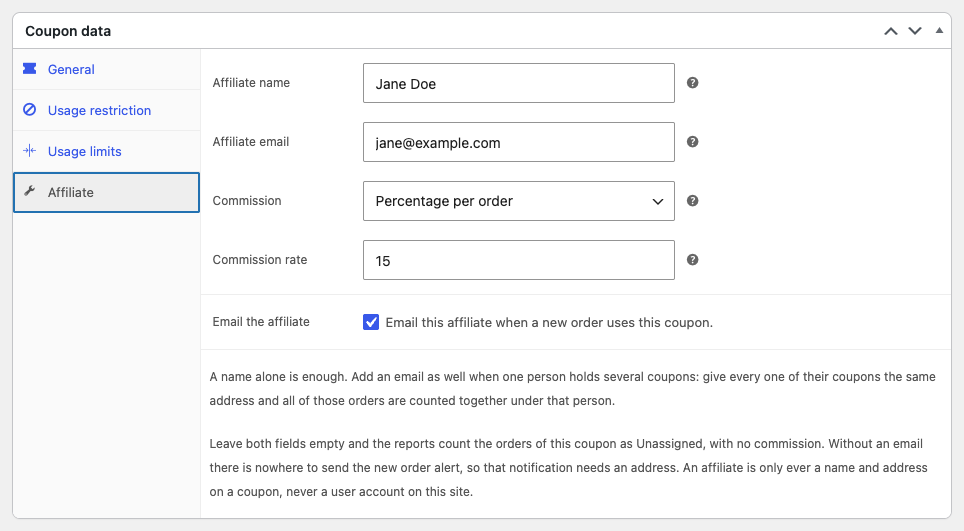
The fields
| Field | What it does |
|---|---|
| Affiliate name | The name the affiliate is listed under in the reports. A name on its own is enough to start reporting on the coupon. |
| Affiliate email | Optional. Coupons with the same email address count as one affiliate, and the address is where the new order email goes. |
| Commission | Whether the coupon earns the store’s default rate, its own rate, or nothing. Shown only while commission tracking is on. See Giving an affiliate their own rate. |
| Commission rate | The coupon’s own percentage or fixed amount. Shown only while commission tracking is on. |
| Email the affiliate | Tick it to email the affiliate each time a new order uses this coupon. It needs an Affiliate email. See The new order email. |
Hover over the question mark next to a field for a short explanation. Email the affiliate has its explanation next to the box.
Your browser refuses to update the coupon while Affiliate email holds a malformed address, and it may not say why when the Affiliate tab is not the one open. An address the browser accepts but WordPress does not, such as one without a domain ending, is saved as empty and the coupon is grouped by its name. Check the field after you update the coupon.
What saving does
When you click Update, the coupon’s orders are credited to the affiliate you entered, including every past order that used the coupon. Orders you have already paid another affiliate for stay with that affiliate.
Changing the coupon’s code later keeps its past orders with the affiliate: the plugin also finds a coupon by the ID WooCommerce records on each order.
No emails are sent for past orders. The new order email only goes out for orders placed or changing status from then on.
Saving only reaches orders the plugin has indexed. If you just installed the plugin, build the report index first. See The report index.
An empty tab
A coupon with no name and no email has no affiliate. It earns no commission, sends no emails and is missing from the Payouts screen. Its orders are still counted in the reports, under “Unassigned”.
To take a coupon away from an affiliate, clear both fields and update the coupon. Its orders become unassigned, except those already paid for.